
What we did: we rendered our own 8 resume PDF templates at run time from the exact code this product ships, sourced 5 additional, openly-licensed resume templates chosen for the same structural patterns common in Canva and Etsy templates (two-column layouts, graphical photo sidebars, icon-heavy designs), and ran all 13 through two independent PDF text-extraction engines — one of them the exact engine MyResumeKit's free ATS checker uses in production today. We are publishing every score — including the two of our own templates that scored worse than four of the five outside templates when we first ran this.
If you have ever wondered whether a good-looking resume template actually survives contact with an ATS, this is an attempt to answer that with a real, reproducible measurement instead of a guess. It found a genuine defect in two of our own paid templates, which we published before fixing and have now fixed; the before-and-after is in the results below rather than edited out.
Why We Ran This Study
Anyone researching resume formatting eventually runs into a version of the same worry: "I like this template, but will an ATS actually read it correctly?" It is a reasonable question, and most of the advice answering it is opinion dressed up as certainty — including, until now, some of our own. This site has told readers that multi-column layouts and graphical sidebars parse poorly. That claim deserved a real test rather than a repeated assertion.
So we built one. Not against a commercial ATS platform — those are proprietary, non-reproducible, and mostly gated behind paid trial accounts a reader could never verify independently. Instead we built a harness against two real, independent, open-source text-extraction engines, committed the harness to this site's repository, and published the raw results.
One limitation up front, not buried at the bottom: the five outside templates in this study are openly-licensed LaTeX templates hosted on GitHub, not the paid, drag-and-drop templates actually sold on Canva or Etsy. We wanted to test real commercial templates and ran into a real constraint — no reasonable way to acquire, measure, and republish findings about a paid, closed-license product without either violating its terms or leaving a reader unable to verify anything. Openly-licensed templates let us measure honestly and let any reader check our work. It also means you should not read "openly-licensed template X scored Y" as "the Canva template you're using scored Y" — see Limitations for the full reasoning.
What We Tested
Our own 8 templates — ClassicPDF, ModernPDF, MinimalPDF, ExecutivePDF, TechnicalPDF, CreativePDF, CompactPDF, and AcademicPDF — were rendered directly from the live @react-pdf/renderer components this product ships, using one fixed sample resume. They are never read from a stored file, so the study can never silently drift out of sync with what actually ships.
5 third-party templates, selected for structural variety and confirmed under an unambiguous open-source license before use:
| Template (as labeled in our results) | Structure | Source |
|---|---|---|
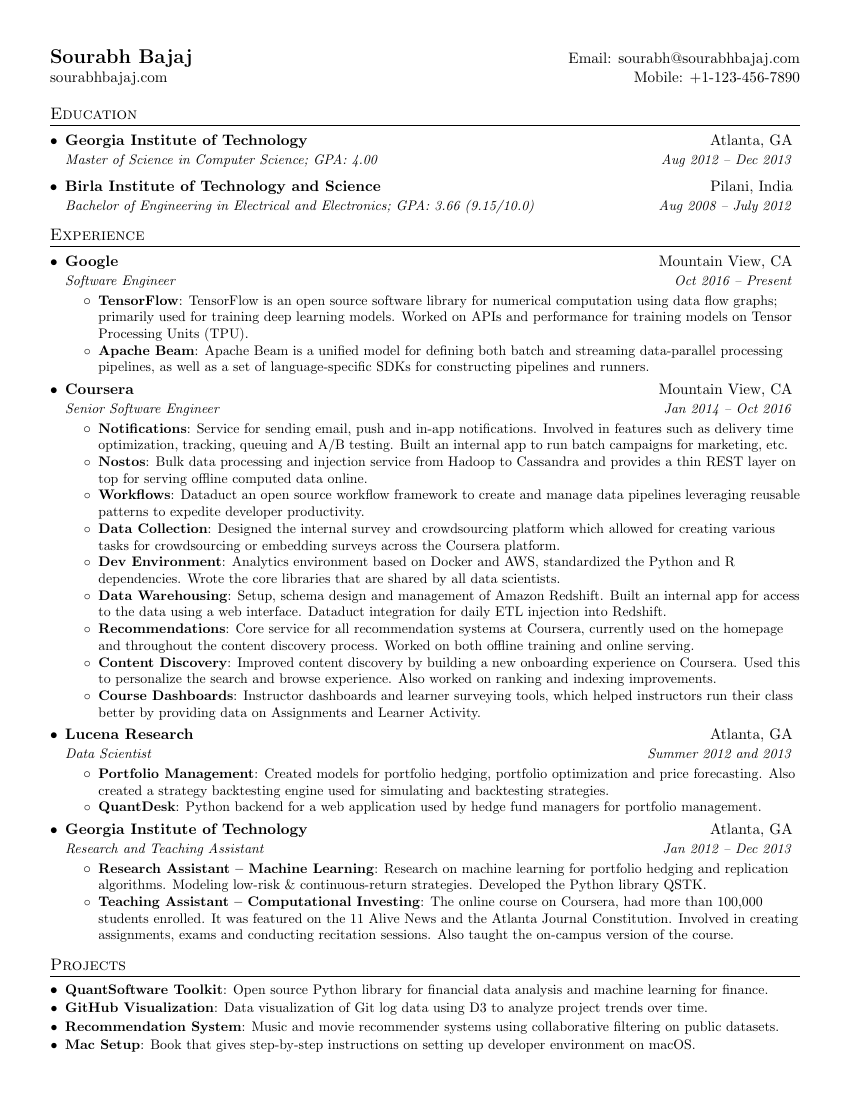
oss-latex-classic-singlecolumn | Single-column, plain text-first layout | sb2nov/resume (MIT) |
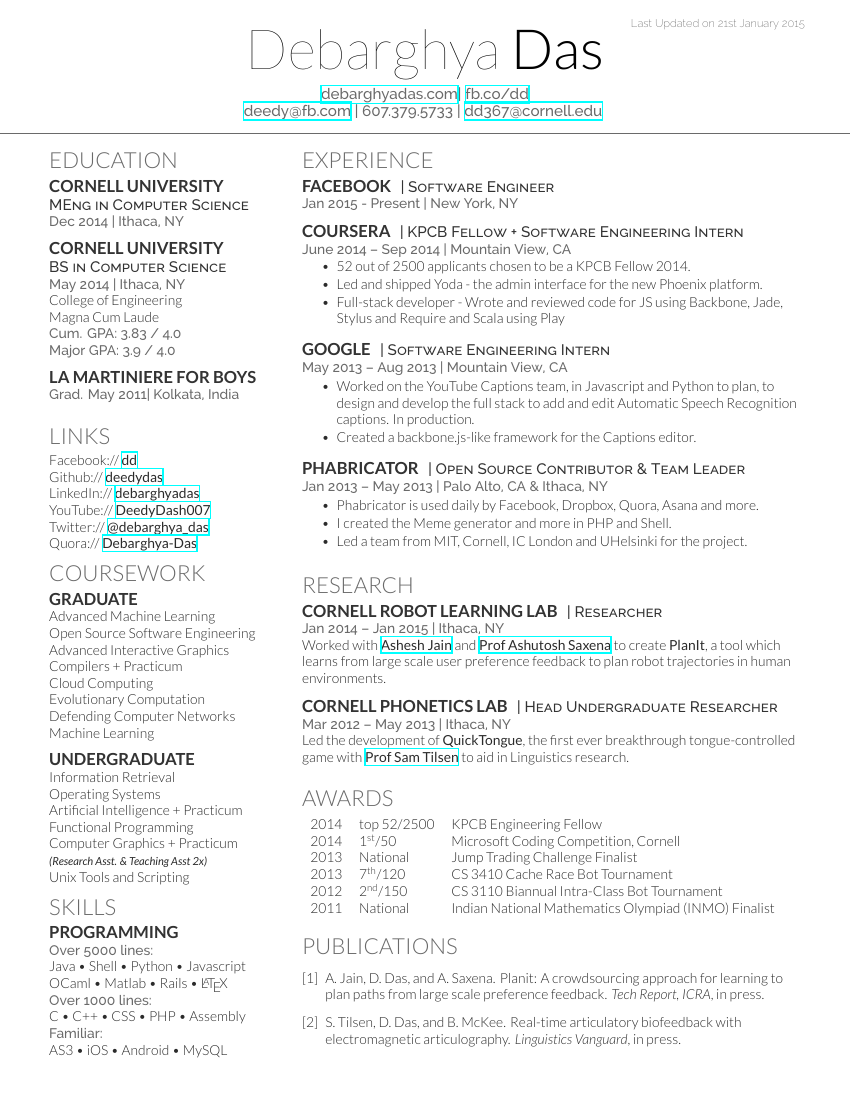
oss-latex-twocolumn-asymmetric | Two-column, narrow sidebar + wide main column | deedy/Deedy-Resume (Apache-2.0) |
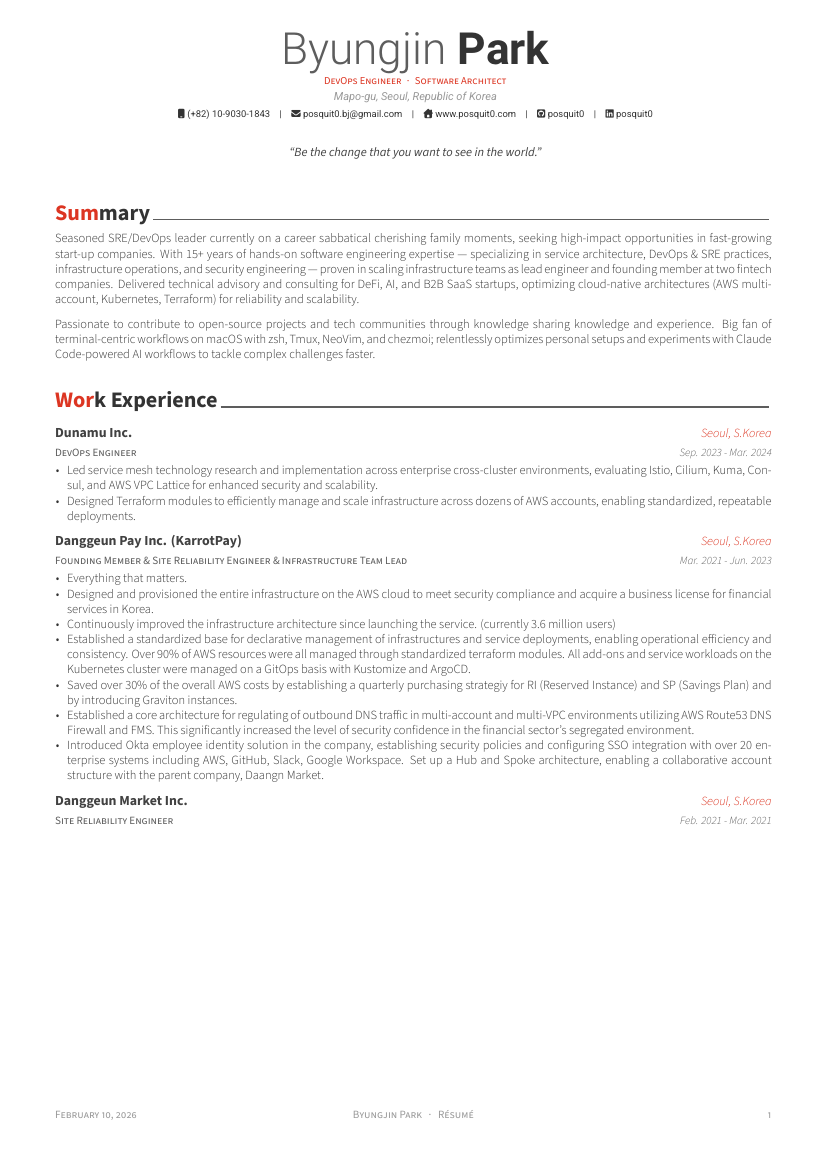
oss-latex-awesomecv-photo-header | Single-column body with a full-width graphical color header and photo | posquit0/Awesome-CV (LPPL-1.3c) |
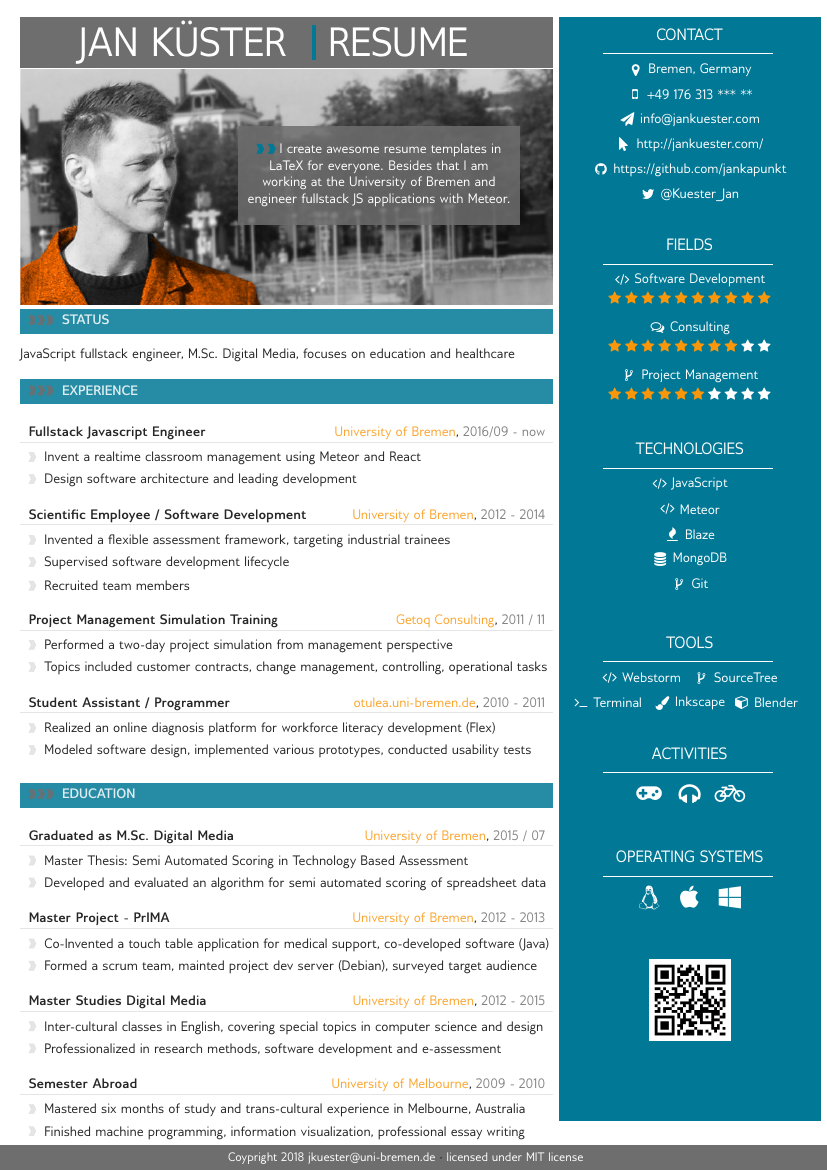
oss-latex-sidebar-photo | Two-column with a colored graphical sidebar containing a photo and contact icons | jankapunkt/latexcv, sidebar style (MIT) |
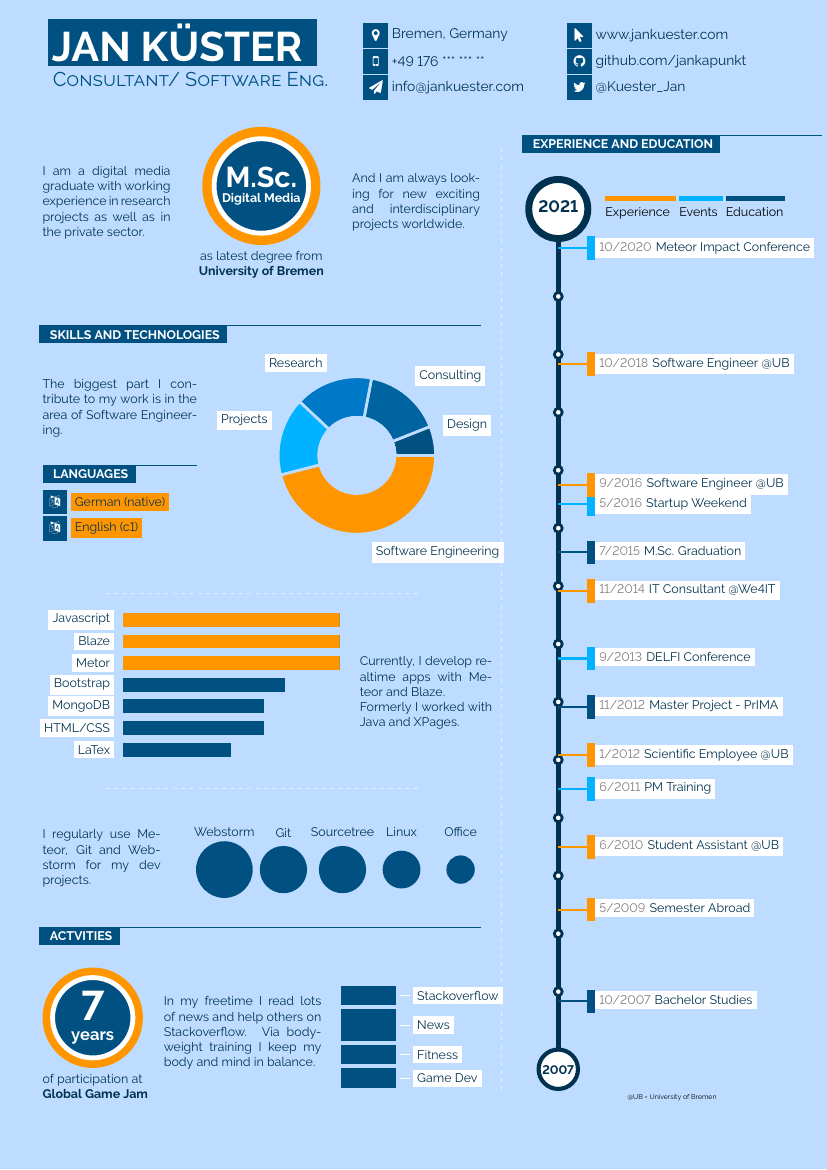
oss-latex-infographic-icons | Icon- and progress-bar-heavy infographic layout | jankapunkt/latexcv, infographics style (MIT) |
Two of these five (oss-latex-sidebar-photo and oss-latex-infographic-icons) come from the same source repository, jankapunkt/latexcv, which publishes several distinct template designs — disclosed here rather than left implicit, since it means the third-party sample draws on 4 distinct authors, not 5.
None of the five source PDFs, .tex files, or any other third-party asset is redistributed in this article or committed to our repository — only our own factual description of each template's structure, our own screenshots of the rendered output, and the measured numbers.
Method
Two independent PDF text-extraction engines were used against all 13 templates:
- mupdf — the exact extraction path MyResumeKit's free ATS checker uses in production today, so these results describe what actually happens to a real uploaded resume, not a hypothetical.
- pdf-parse — a second, independent engine used only to cross-check mupdf. Where the two engines disagree, both numbers are published; neither is treated as the correct one.
Each (template, engine) pair produces a 0–100 overall score from four weighted sub-scores — Completeness, Action Verbs, Keyword Density, and Formatting — the same scoring pipeline the live product uses. Full field definitions are documented alongside the harness itself.
Reproduce it yourself:
npx tsx scripts/parse-test/run-study.ts
Run without flags, this reproduces our own 8-template results exactly — the harness makes no network calls, uses no AI model, and produces a byte-identical results file on every run against an unchanged codebase. An optional --input <directory> flag lets you point the same harness at your own set of resume PDFs (including, if you want to check this yourself, your own Canva or Etsy export) and measures them the same way, without ever committing or redistributing the files themselves.
Results: Our Own 8 Templates
| Template | mupdf score | pdf-parse score | Notes |
|---|---|---|---|
| ClassicPDF | 89 | 89 | Clean extraction, both engines agree |
| ModernPDF | 89 | 89 | Clean extraction, both engines agree |
| ExecutivePDF | 89 | 89 | Clean extraction, both engines agree |
| CompactPDF | 89 | 89 | Clean extraction, both engines agree |
| MinimalPDF | 89 | 85 | Engine disagreement — see below |
| CreativePDF | 89 | 85 | Same engine disagreement as MinimalPDF |
| TechnicalPDF | 89 | 89 | Was 45/45 — real defect, found by this study and fixed 2026-08-03; a separate extraction gap closed 2026-08-27 |
| AcademicPDF | 89 | 89 | Was 45/45 — same defect, fixed 2026-08-03; same extraction gap closed 2026-08-27 |
The most useful thing this study did was fail. When we first ran the harness on 2026-08-02, AcademicPDF and TechnicalPDF scored 45 out of 100 on both extraction engines, with zero experience entries and zero education entries recovered by either one. Two of our own paid templates were materially worse at the one job this product exists to do, and we had been shipping them that way without knowing.
The cause was a letterSpacing: 1.5 style applied to section headings for visual effect. At that tracking, the rendered PDF gives each glyph enough horizontal advance that extractors recover "E X P E R I E N C E" instead of "EXPERIENCE" — enough to defeat the exact-text section-header matching the scoring pipeline relies on, so the experience and education sections were invisible to the parser even though the words were present in the file. Both independent engines agreed on the failure, which means it was a property of the PDF itself, not a quirk of one parser.
Fixed 2026-08-03. Reducing the tracking to 0.8 — the highest value we have measured evidence for, matching MinimalPDF, which extracts cleanly — recovered both templates to 86/86, with experience entries back to 3 and education back to 1, exactly matching the healthy templates. The other six templates' scores did not move at all. The fix is one style value per template; the monospace face on TechnicalPDF and the hairline rule on AcademicPDF were what carried those designs, so neither lost its identity.
We are leaving the original numbers in this article rather than replacing them with the clean ones, for two reasons. First, a study that quietly overwrites its own inconvenient result is not evidence of anything. Second, the before-and-after is the finding: it is the specific, reproducible demonstration that this measurement catches real defects in real shipping products — including ours. A regression test (tests/pdf-letterspacing.test.ts) now fails the build if any template's heading tracking goes back above 0.8, so this particular mistake cannot return silently.
If you exported an Academic or Technical resume from this site before 2026-08-03, that file has the wide heading tracking and may parse poorly. Rebuilding and re-exporting produces the corrected version.
The engine disagreement: CreativePDF scored 86 on mupdf but only 82 on pdf-parse when this was first published; MinimalPDF scored 89 on mupdf and 82 on pdf-parse. Part of the pdf-parse-only gap for both is a name-recovery issue that remains open today: pdf-parse merges the candidate's name and the contact-info line with no separating space, so the name field fails to recover cleanly, while mupdf preserves the line break and recovers it correctly. That mechanism is unrelated to the job-title/company issue described next, and it has not been fixed — it is why MinimalPDF and CreativePDF are still the two lowest-scoring pairs in the table above (85 on pdf-parse each) even after every job-title/company shape below was closed. MinimalPDF's mupdf score sits above CreativePDF's original score for a second, unrelated reason: MinimalPDF writes job title and company on one comma-joined line, a format our parser under-recovered until a 2026-08-23 fix that raised MinimalPDF's mupdf score from 86 to 89 (Formatting 80 → 100) and cleared its "Add company name and job title" tip. CreativePDF's title and company sat on two separate lines instead — a different limitation that fix did not touch, and one three more fixes were needed to close.
A 2026-08-25 fix reached exactly one of our eight templates, ModernPDF, whose mupdf-extracted text happens to put the company line immediately before the date line — the one shape that fix recognized (mupdf score 86 → 89, Formatting 80 → 100, tip cleared). CreativePDF, ExecutivePDF, TechnicalPDF, CompactPDF, and AcademicPDF instead extracted with the date line between the title and the company line on mupdf, a related but different order that fix did not reach; ClassicPDF used a third, single-line "Title at Company" format neither fix addressed. As of the 2026-08-25 measurement, all six of those templates — CreativePDF included — still carried the wrong tip.
Two more fixes, both measured 2026-08-27, closed the rest. The first added a forward-looking company absorb for the Title/Date/Company order and a splitter for the single-line "Title at Company" form, closing the remaining mupdf gap on the last six templates still carrying it (Classic, Executive, Technical, Creative, Compact, Academic). The second addressed a separate, structurally different defect specific to pdf-parse: that engine glues the date range onto whichever line precedes it in the file's content stream, which had been silently fabricating a company name out of the previous bullet point on several templates; a refusal-gated extraction of the text to the left of the date closed that gap on all eight templates on pdf-parse too. Both fixes were verified against the real, rendered PDF output for every template rather than a hand-written text fixture — that same discipline is what first showed the 2026-08-25 fix had reached one template, not the seven it was originally believed to reach, and it is the check that measured these two fixes' actual scope before this paragraph was written.
The measured wrong-tip count on scripts/parse-test/results/own-templates.json (run 2026-08-27) is zero across all 16 (template, engine) pairs — no result carries the "Add company name and job title to all experience entries" tip. The name-recovery gap on MinimalPDF and CreativePDF's pdf-parse extraction, described above, remains open and is unrelated to any of this. Neither engine is "wrong" on that remaining question; it is a genuine difference in how two independent, widely-used libraries interpret the same PDF content stream, and it is a useful reminder on its own that no single extraction tool's score is the final word on how any resume will parse.
Results: Five Third-Party Templates
| Template | mupdf score | pdf-parse score | Notes |
|---|---|---|---|
oss-latex-twocolumn-asymmetric | 65 | 61 | Best-scoring third-party template; full field recovery on both engines |
oss-latex-sidebar-photo | 64 | 56 | Email address not recovered on either engine |
oss-latex-classic-singlecolumn | 55 | 59 | Full field recovery, but a very low Action Verbs sub-score |
oss-latex-awesomecv-photo-header | 52 | 51 | Phone number not recovered; zero experience entries recovered despite real work history in the source content |
oss-latex-infographic-icons | 37 | 40 | Worst-scoring template in the entire 13-template study |
oss-latex-twocolumn-asymmetric (structure: a narrow sidebar column beside a wide main column) recovered name, email, phone, six experience entries, and two education entries cleanly on both engines — the best result of any third-party template, and proof that "two-column" alone does not doom a resume to parsing badly.
oss-latex-sidebar-photo (structure: a colored graphical sidebar holding a photo and contact icons, next to a main text column) lost the email address entirely on both engines — a real extraction failure, not an engine disagreement. The contact information lives inside the graphical sidebar block rather than the main text flow, which is exactly the kind of layout choice that puts information at risk during extraction.
oss-latex-classic-singlecolumn (structure: plain single-column, text-first) recovered every field cleanly on both engines but scored only 55–59 overall because of a very low Action Verbs sub-score. That sub-score reflects the specific candidate content in this particular public demonstration PDF — bullet points that do not open with action verbs — more than the template's structural design; see Limitations for why our own 8-template results and the third-party results are not directly comparable on content-driven sub-scores.
oss-latex-awesomecv-photo-header (structure: single-column body under a full-width graphical color header with a photo) lost the phone number on both engines, and both engines recovered zero experience entries despite the source content containing real work history — the graphical header block appears to disrupt reading order enough that the parser cannot locate the experience section that follows it.
oss-latex-infographic-icons (structure: icon- and progress-bar-heavy infographic layout) is the worst-scoring template measured anywhere in this study, own or third-party. mupdf failed to recover the email address at all (pdf-parse recovered it); neither engine recovered a single experience or education entry. Of every layout style tested, heavy reliance on icons and graphical progress bars in place of plain text was the most structurally hostile to clean extraction.
The Uncomfortable Part
Here is the comparison we are required to state plainly rather than soften. As first measured on 2026-08-02, our own AcademicPDF and TechnicalPDF templates scored 45/100 on both engines — worse than four of the five third-party templates, including two-column and graphical-header layouts. Only one third-party template, the icon-heavy oss-latex-infographic-icons (37/40), scored worse than our own worst two. For as long as those templates shipped that way, a paying customer choosing Academic or Technical got a worse-parsing resume than they would have got from a free LaTeX template off GitHub. That is the honest version of the sentence.
Both templates now measure 89/89, after both the 2026-08-03 letter-spacing fix described above and the job-title/company extraction fixes described in the section above, the last of which closed 2026-08-27 — so the current standing is that all eight of ours score 85–89 (scripts/parse-test/results/own-templates.json, run 2026-08-27), higher than every third-party template we measured. That comparison omits something worth stating plainly rather than leaving in the numbers alone: at the time the 82–89 range was first published, our own parser recovered no job title from seven of the eight own templates on the mupdf engine (the one this checker runs in production), because of the separate-line header limitation described above — so part of that range reflected a resume field the checker was failing to read, not one it read and scored well. A 2026-08-25 fix closed that gap for exactly one of the eight, ModernPDF. Two further fixes, both measured 2026-08-27, closed the rest — the Title/Date/Company and single-line "Title at Company" shapes on mupdf, and a separate defect specific to pdf-parse, which glues the date range onto whichever line precedes it and had been silently fabricating a company name out of the previous bullet on several templates. As of this writing, zero of the 16 (template, engine) pairs carry the tip, and the published range has moved from 82–89 to 85–89 with it (scripts/parse-test/results/own-templates.json, run 2026-08-27). We are not presenting the 85–89 range as the study's headline, because the number that tells you something about how this product is built is the 45, not the 89. Anyone can publish a table where they win. What the 45 shows is that the measurement is real enough to catch us, and that we ran it against ourselves, published the intermediate results while the defect was still there, and kept measuring until it wasn't.
The narrower practical point still stands and is worth separating from our own case: the two structural patterns that hurt scores were consistent across our templates and the third-party ones — text inside graphical sidebars or icon blocks, and section headings styled so that exact-text matching breaks. Those are the things to check on any resume, from any builder.
What This Study Does and Does Not Tell You
These are open-source text-extraction engines, not commercial ATS platforms. mupdf and pdf-parse measure whether text extracts cleanly and in a sensible order from a PDF. They do not replicate any specific commercial ATS vendor's proprietary parsing or ranking logic. A template that extracts cleanly here may still be scored, ranked, or displayed differently by a real employer's ATS for reasons this test cannot measure — this study is a proxy for parsing fidelity, not a prediction of any named product's behavior.
The third-party sample is 5 openly-licensed templates chosen for structural variety, not a random or representative sample of what job seekers actually buy on Canva or Etsy. This is the direct trade-off of testing openly-licensed templates instead of paid, closed-license ones: these are free, GitHub-hosted LaTeX templates favored by a technically fluent audience, not the drag-and-drop templates sold to a non-technical audience on Canva or Etsy. Do not read "this open-source template scored X" as "the Canva bestseller you're using scored X" — only as "a template using this same structural pattern scored X."
Sample size is small: 8 of our own templates plus 5 third-party templates, 13 total. Two of the five third-party templates share a source repository (jankapunkt/latexcv), so the third-party leg draws on 4 distinct template authors, not 5.
Our own 8 templates use one fixed sample resume; the third-party templates each carry their original author's own real demonstration content, different names, different job histories, different lengths. That means a cross-template score comparison is measuring two different things — fixed content through varied structure for our own 8, and varied content through varied structure for the third-party 5. The Formatting and field-recovery sub-measurements are the most structure-attributable parts of each score for this reason; a low Action Verbs sub-score on a third-party template may reflect that author's writing more than the template's structure.
The third-party PDFs were LaTeX-rendered by their original authors; our own templates are rendered at run time by @react-pdf/renderer. Different rendering engines can produce PDFs with different internal text encoding even for visually similar layouts, and this study does not isolate that variable.
A template that extracts cleanly is not the only thing that matters. Keyword relevance, resume content quality, and a candidate's actual qualifications are entirely outside this study's scope.
How to Reproduce This
The full harness, both result files (own-templates.json and third-party-templates.json), and the methodology this article draws from are committed to this site's repository. Run npx tsx scripts/parse-test/run-study.ts to reproduce our own 8-template results exactly. The third-party results cannot be reproduced byte-for-byte without downloading the same five source PDFs yourself (we do not redistribute them), but the harness will measure any PDF, DOCX, or TXT resume you point it at via the --input flag — including your own resume, or a template you are considering.
What Actually Helps
None of this requires abandoning a template you like. What consistently hurt scores across both our own and the third-party set was specific, not stylistic: contact information or section content living inside a graphical sidebar or icon block instead of the main text flow, and section headings styled in a way that defeats exact-text matching. A single-column layout with standard headings and no embedded graphics is the safest default — it is also how MyResumeKit's own templates that scored 85–89 in this study are built. If you want to check where your current resume stands, MyResumeKit's free ATS checker runs the same underlying extraction path measured here, with no account required. For the honest version of the broader "does an ATS auto-reject resumes" question this study sits next to, see our debunk of that myth — and for a comparison of other free ATS checking tools, see our comparison post, which we have updated with these same measured numbers. If you're weighing a one-time PDF payment against a subscription resume builder, our pricing comparison covers that decision on its own terms.
Check your resume's ATS parse readiness for free or start building an ATS-tested resume →